
Stream the Eurosong Webcast
 The Eurovision Song Contest has been one of the most watched television events in Europe for over fifty years.
Abba and Celine Dion are just a few entertainers who started their careers by competing at the Eurovision Song Contest.
The U.S. broadcasters don’t carry this pop music spectacle but if you live in the U.S. or anywhere else in the world and have access to a moderately fast internet connection you can watch the Eurosong spectacle via a live webcast.
The setup is relatively simple on Windows and Mac OS X and slighlty more complicated on Linux. This short tutorial outlines the Windows setup. Mac and Linux users should follow the provided links and instructions at the official Eurovision Song Contest site.
The Eurovision Song Contest Webcast, the Easy Way
- Direct your Internet Explorer or Firefox browser to http://www.eurovision.tv/page/webtv. If your computer already has the Octoshape plugin installed you should be able to see picture playback at this point.
- You may see the message saying that the Octoshape plugin is not installed. Click on “Play the stream” anyway and Windows Media Player will launch. If Windows Media Player does not recognize the stream you definitely do not have the Octoshape plugin installed on your computer.
To install the plugin visit http://www.octoshape.com/support/infinite-hd-octoshape-app/. Follow the installation instructions and when complete repeat the steps 1 and 2. Enjoy the show.
During the webcast in May the live stream will be available at the ESCTV site. Until then you may view prerecorded selections at the right column.
The Eurovision Song Contest Webcast, the “Hard” Way (Optional)
If you don’t feel like the “Easy Way” is challenging enough, don’t stop after you install the Octoshape plugin. Instead of staring at the computer monitor you can actually watch the Eurovision Song Contest on your TV at near broadcast quality.
If your graphics card has a composite video or S-Video out you can connect this output to most TVs. This type of graphics card will allow you to either clone the desktop to the video out so that both the external TV and the computer monitor show the same picture. Alternately, the card will let you use the dual output where your TV acts as the second screen. Either configuration is acceptable and depends on your preferences.
I prefer playing Octoshape stream in an external player like Windows Media Player because sometimes the Flash based implementations of within-the-browser stream have issues with full screen playback. If your Firefox keeps insisting on launching the stream within the browser instead of external media player you can disable the Firefox extension that handles Octoshape streams. Make sure the Octoshape plugin is running when you attempt to stream the Eurosong contest (you can also configure the Octoshape plugin to run when the computer starts).
Once the Windows Media Player starts playing the stream press ALT+ENTER to enlarge to full screen.
For Tech Inclined Readers
The Octoshape plugin is not a codec but a peer-to-peer technology that enables efficient webcast of high demand programs like live events. CNN used it for the President Obama inaguration live webcast. In addition to Eurovision many foreign language networks use the Octoshape. There are other examples of Octoshape streams.
Peer-to-peer networking works similar to Skype or file sharing. As you are downloading to your computer your machine is uploading to other users who are viewing the same content. Unlike central distribution from a single server(s) like YouTube, the Octoshape plugin depends on the grid of interconnected users to distribute the content. The topology of this network removes the bandwidth burden from the central server and minimizes service drops when there are hundreds of thousands of viewers watching the stream.
Because the Octoshape uses your Internet connection to upload the stream to other users you may want to verify if peer-to-peer setups violate terms of agreement with your Internet service provider. Allegedly the plugin does not utilize your upload bandwidth in the idle mode.
The plugin can be deployed on the client side via Flash or Windows Media Player.
The picture quality of Octoshape payload is determined by the codec (FLV, H.264, etc.) and the bitrate employed by the broadcaster. A high quality bitrate may peak around 800 kbps and will adjust lower if your connection can not handle the bandwidth. For reference, the average bitrate on a good quality DVD is around 7,000 kbps (MPEG-2).
Setting Up a Media Server (Optional)
I have an old Windows XP based computer acting as a media server. This machine has an old Nvidia graphics card with a composite video output which allows me to watch the content on a regular standard definition TV. I use this setup to watch all kinds of materials, from video podcasts via iTunes, YouTube to Netflix downloads and multiple region DVDs. Of course, the Eurovision webcast is my main reason for setting up this machine.
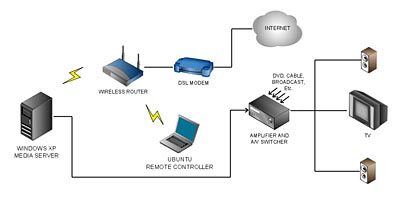 The Nvidia card is setup in clone mode with composite video output as the primary monitor. When the computer starts up I get to see all the bootup messages on the TV!
The computer has no other monitor attached, no keyboard, no mouse. Certain motherboards will not start without keyboard attached so you will have to override the keyboard detection in the BIOS.
Make sure the desktop pixel resolution is relatively low because high resolution text will be entirely impossible to read on a TV. Television resolution in North America is 720×486 pixels and 720×586 in Europe so don’t be afraid to go low and use large fonts.
The computer has a wireless card because it is located in a place where I don’t have a network cable connection. When it boots up it launches VNC server so I can control the computer using a VNC based remote with a cheap Linux based laptop. This remote control computer can also run Windows or OS X but Ubuntu operating system is free and comes with Vinagre remote software already included.
Instead of VNC based remote, you can use Windows Remote Desktop which also works great, or you don’t even need the second computer if you put a Bluetooth card into the server and get a wireless Bluetooth keyboard with a trackball. The only problem with the latter is that reading computer desktop and browser content on a standard definition TV is very hard. I mainly use my VNC remote on a Linux laptop for text legibility.
Good luck with your setup!