
Don’t Be on the Receiving End
To better understand how to protect yourself from people who may compromise your wireless network we need to learn what they do in order to get inside.
To protect yourself from a breach you must think like a hacker. Chances are slim but the intruder may not be your first door neighbor at all. A hacker with a powerful high gain WiFi antenna could be sitting hundreds of meters away and siphoning off your internet connection.
Two basic things can happen:
- An intruder can log into your network and use the Internet connection.
- An intruder can log into your wireless access point (AP) and modify the settings to better suit his needs.
Scenario 1
Let’s examine the first of the two possibilities. Wireless routers come without any security enabled by default. This is understandable. You need to connect to your router for the first time without the password before you can create one.
If you don’t set the security settings and don’t create a password your wireless network will remain unlocked so anyone can connect to it. The intruders can not compromise your computer(s) easily but they can use your Internet connection.
This may not be a big deal. I typically leave one of my networks open for anyone in the neighborhood to connect to. I live in a working class neighborhood and don’t mind local kids who can’t afford their own Internet service.
On the other hand when you realize that a bunch of people are hogging your speed by downloading crappy YouTube videos you may want to enable security and prevent unauthorized access.
When you decide to do that use WPA instead of WEP. It is a newer and more secure standard. The way you actually implement the security will depend on your wireless router and your computer’s operating system (Windows Vista, XP, Mac, Etc.) The documentation you received with the router will describe the whole process in detail. A strong password will deny hackers the opportunity to log into your network, use the Internet and make changes to your setup.
Scenario 2
There is another weak point a hacker may exploit when WPA or WEP security is disabled. Your wireless router can be wirelessly controlled via a web browser. This is a great feature that allows you to adjust router settings from anywhere within your house.
The problem is that after the initial router setup majority of people do not change the default router password leaving the device accessible to a hacker. Changing the default password is easy to do in your router’s control panel. Most wireless routers ship with IP address 192.168.1.1. When you type these numbers into your browser you will be taken to the router’s settings panel which is nothing more than a webpage generated by the router.
This webpage will prompt you for a user name and password. If you have the documentation that came with the router the default IP address, user name and password will all be listed there. For example Linksys WRT54G router can be accessed by using these factory defaults:
IP: 192.168.1.1
user name: admin
password: admin
Leaving these three values at their factory defaults is like leaving your car unlocked and running. Changing the IP address but leaving the user name and password at their default setting is a weak form of protection.
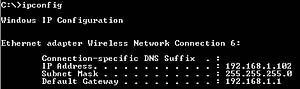
The IP address can easily be obtained by executing IPCONFIG command in Windows command line while connected to the WiFi network. The IPCONFIG command will return the “Default Gateway” IP address. This is the router’s home address [Fig. 1].
Knowing which router brand you have is sometimes enough for a hacker to obtain login information. There are many websites that list default passwords.
What’s a big deal if someone enters your wireless router settings? They could do a number of things.
For example, they could boot you off your own Internet connection by implementing WPA security. They would have the password, you would not. However, this is an extremely visible intrusion that most Internet subscribers would react to immediately.
They could enable the log to track what websites you visit. Of course, this in itself is of little use to a hacker and there are better ways to obtain detailed information about your Internet activities.
They could decrease the amount of bandwidth allocated to your computers while allowing maximum throughput for themselves. This would allow the hacker to choke your speed while he can enjoy full broadband capabilities.
But there is something more sinister. A skilled hacker could completely hijack your router while allowing you to access the Internet through his router at decreased speeds. There’s a chance you’d never know this happened because you’d still have uninterrupted net access albeit at lower speeds. Let’s look at this idea in more detail.
In a “friendly neighbor” scenario both you and the hacker have their wireless routers that are used to connect to the internet. Let’s pretend that your SSID is “Linksys” and the hacker’s SSID is “Hack.” Every time you log into your network you see the name of your router and the name of your hacker neighbor’s router [Fig. 2].
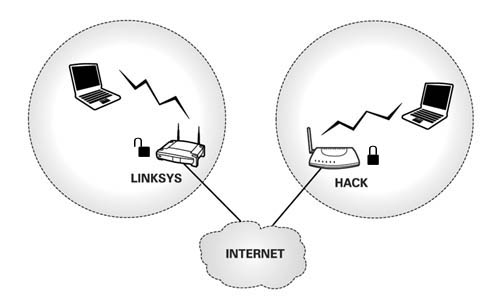
Your computer uses something called SSID to identify and differentiate between all available wireless networks. Each wireless router broadcasts one SSID (it’s possible to suppress the SSID broadcast but this is another subject) and your notebook computer looks for the SSID when connecting to the wireless network [Fig. 3]. SSID can be seen as the name of a network. It can be the default name the router came with or it can be any name you create in the router’s control panel.
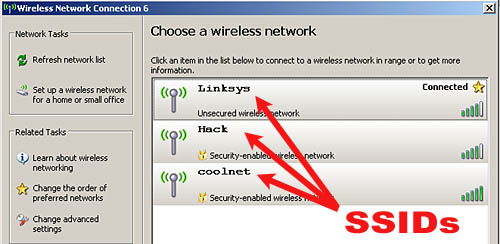
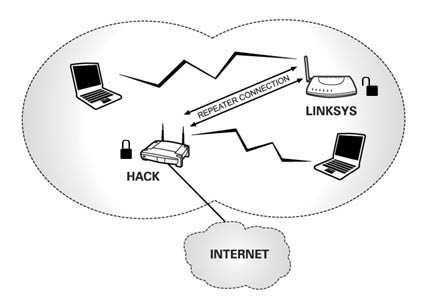
The hacker can swap out the SSID’s of your and his router so you become “Hack” and he becomes “Linksys.” This is simple enough to do in the routers’ control panels. After this is done the intruder could setup his router to work as a repeater and enable WPA security on your router. At this point the hacker may as well cancel his broadband internet subscription.
What does all this do? Let look at it [Fig. 4]. The “Linksys” router that your computer always logs into is really not your own router any more. It is the hacker’s router. You log into his router thinking it’s yours and because his router is setup to repeat your WiFi you can still get out on the Internet and may never notice any difference. The hacker on the other hand is accessing your router which has been renamed to “Hack.”
Hacker enjoys the full benefits of a secured WPA connection which would otherwise be unavailable had he been just plain logging into your router without all this extra gymnastics. By filtering out all other neighborhood users except for you he doesn’t take chances of someone else using the connection. You on the other hand are still happy go lucky and will never know something is going on unless the hacker has intentionally limited your speed so he can have faster downloads.
What we can learn from these two examples is that leaving default passwords and leaving your WiFi connection unprotected can be a bad idea. Still, the chances that someone is leeching off your connection are limited at best.
Given enough time and resources a hacker might still be able to hack into your network, but taking the steps above will make your network a harder target which will hopefully frustrate a hacker and cause them to move on to an easier target.